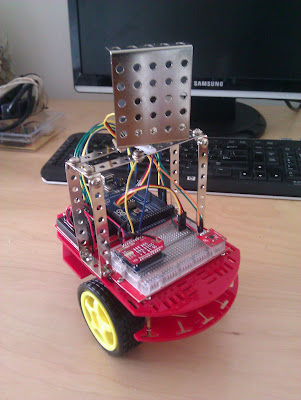
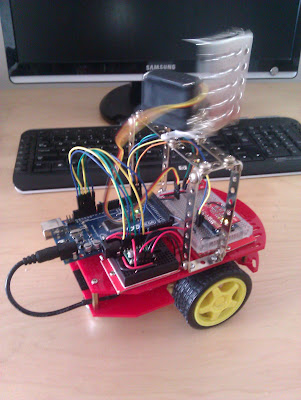
 This is the fourth post in a pseudo-series about an autonomous wi-fi connected robot I’m working on. So far we’ve looked at:
1. A low-cost and easy Robot Chassis to serve as the body of the robot.
2. Adding a RN-XV WiFly Module to enable wi-fi connectivity.
3. A Python Server which communicates with the robot.
To reiterate, the idea is to have an Arduino robot which transmits sensor data over wi-fi to a Python server. The server then interprets the data and sends actuator commands back to the robot. We’ve achieved a round trip of data so far, next we try to refine what we have and add an actual sensor and actuator.
This is the fourth post in a pseudo-series about an autonomous wi-fi connected robot I’m working on. So far we’ve looked at:
1. A low-cost and easy Robot Chassis to serve as the body of the robot.
2. Adding a RN-XV WiFly Module to enable wi-fi connectivity.
3. A Python Server which communicates with the robot.
To reiterate, the idea is to have an Arduino robot which transmits sensor data over wi-fi to a Python server. The server then interprets the data and sends actuator commands back to the robot. We’ve achieved a round trip of data so far, next we try to refine what we have and add an actual sensor and actuator.
Robot Torso and Head
My impulse buy a few weeks ago has actually come in handy to build up the body of the robot… The Eitech Classic Construction Kit includes all the flat metal pieces with holes which you see in the images above and below.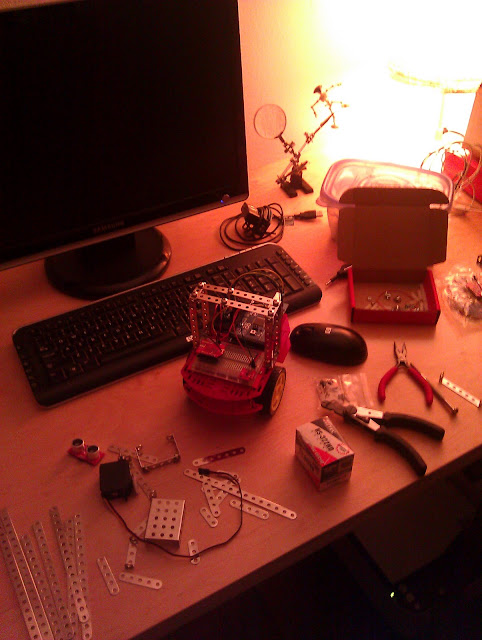
As these pictures show, I used the Eitech parts to make a simple rectangular frame for the torso. The Eitech screws are unfortunately a tiny bit too wide to screw into the acrylic top of the Magician Chassis, but some slightly smaller 4-40 size screws did the job.
Neck Servo
Technically, the first actuators I added were the 2 wheel motors. However, I’m leaving them unplugged from their power source for now. Time to add a rotating head. On top of this frame, I mounted an upside-down servo to serve as a head. Luckily the face plate easily attached to the servo using a couple of Eitech screws and nuts.
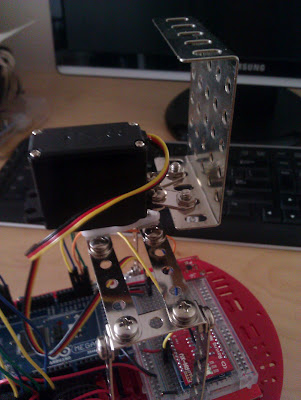 |
| Close-up of how servo is mounted |
A Sense of Direction
Next I added an HMC5883L Magnetometer to serve as the robots first sensor. A magnetometer is just a simple digital compass. Its fairly straightforward to use and there’s a very good tutorial on Bildr which covers how to set it up with an Arduino. I plopped it onto the robot’s breadboard, hooked up the 4 wires required, tried the sample code from Bildr, and started getting data from it.

One thing to note however is that it’s not incredibly accurate. Especially if it’s placed physically next to a magnet (like a motor) or just a hunk of metal (like a breadboard)… Simply bringing my wire cutter near it would throw it off by 10-20 degrees or more. In addition, its lacking something called tilt compensation. Unfortunately compasses that include tilt compensation are about 10x the price. So you have to either (a) fork up the cash, (b) live with some error or (c) figure out ways to minimize the error in code or by re-positioning the module. I’ll try to achieve (c) and hopefully revisit this in a later post.
A Common Language
Now that I had at least 1 sensor (the compass) and 1 actuator (the neck servo), there was finally some real data to communicate between the Arduino Robot and the Python Robot Base. It was time to establish a common language for client and server.
In an earlier post, I set up communication between the 2 endpoints using UDP. By the end, I had a simple string of text being transmitted back and forth:
"here is a longer string of data being sent back and forth"Not very useful until you actually include some data. In the past I’ve used simple comma delimited strings such as:
"12,34,56,78,90"This works fine if both endpoints knows what all these numbers mean. For instance the arduino and the server both may know that the first number is the compass value (12), the second number is the proximity sensor value (34). Works but is not very readable for humans.
A better option is to use JSON, which is a concise, readable, standardized, and widely accepted data format. Now I’m transmitting the following JSON string from the Arduino:
{'ip':'192.168.1.6','heading':144}First you may note that I’m sending the IP address of the robot. This is in case messages are being sent from multiple robots or devices, the Python server will know who to respond to with what commands. I created a funtion in my RNXV library called ip() to do this. You can take a closer look at that library to see how the IP is retrieved. Second, how do we actually create this JSON string? One option is to construct the string manually. A better way is to use a tremendously helpful library called aJSON. Check out the source code to see how it’s used.
On the Python side, once the string is received, we parse it and interpret the data. For the parsing, it just so happens that the JSON format very closely resembles the code to create a dictionary in Python. This is how you’d create a dictionary in Python:
data = { 'ip': '192.168.1.6', 'heading': 144 }So we can simply take the JSON string and use the eval function to build a dictionary.
dataRaw, addr = sock.recvfrom( 1024 )
data = eval(dataRaw)
This is a temporary measure. It may break down when we have more complex JSON but is sufficient for now. Later I would probably try to use a JSON library for Python.
Now the Python server constructs a response JSON string to send back to the robot. For starters we aren’t going to try to make any meaningful interpretations. The input value (compass heading) ranges from 0-359 and the output value (neck servo position) ranges from 0-179. So a simple divide by 2 will give us some result to observe.
s = '{"neck":' + str(heading / 2) + "}"Now as you turn the robot in place 360 degree’s, you can observe the head turn 180 degrees.
As an aside, I experienced something very strange when I unplugged the USB cable from the robot and attempted to power it from an external battery. The Arduino would crash almost instantly and stop sending messages to the server. After some research, I discovered that this could be because of message fragments left on the serial buffer which it was trying to process but failing at. I’m still not sure why it only occurs when using external power. I did manage to find a very simple fix. To make sure the JSON message was complete, I added a simple check to make sure the first character is a ‘{‘ and the last is a ‘}’.
Errors would occasionally also occur on the Python side because of badly formatted JSON. So I added the same check in the Python code and that reduced crashes substantially. Once in a while there is still a crash because somehow an odd byte gets lost in the transmission in either direction. Eventually, I will add some more JSON validation to avoid such crashes. At this point, however, I’m still able to keep the robot running for hours with no problems.
Here is the python RobotServer code:
import socket
import time
import math

UDP_IP="192.168.1.7"
UDP_PORT=3000

sock = socket.socket( socket.AF_INET, # Internet
                      socket.SOCK_DGRAM ) # UDP
sock.bind( (UDP_IP,UDP_PORT) )

while True:
    dataRaw, addr = sock.recvfrom( 1024 )
    #prints a string but crashes on OSC msg
    #print("received: " + data.decode(“utf-8″))

    if dataRaw[0] == 123 and dataRaw[-1] == 125: #check for '{' and '}'
        data = eval(dataRaw)
        ip = data["ip"]
        heading = data["heading"]
        s = '{"neck":' + str(heading / 2) + "}"
        print(dataRaw + b"  —->  ” + bytes(s,"utf-8"))
        if len(dataRaw) > 0:
            sock.sendto( bytes(s,"utf-8") + b"\n", 0, (ip, 4000) )
Here is the repo containing the WiFiRobot’s Arduino code.