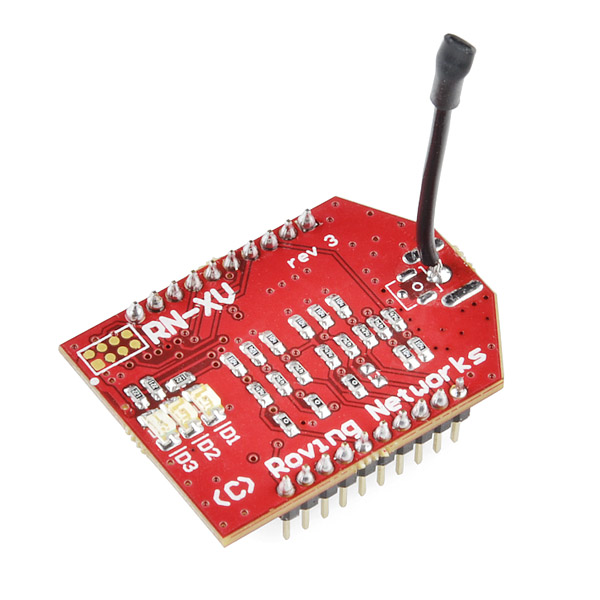
 The RN-XV WiFly Module from Roving Networks is an affordable way to go wireless with your Arduino project. It’s $35 and you only need 1 to get started, assuming you have a wi-fi adapter in your computer as well. Previously, only the more expensive options such as the WiFly GSX ($85) were available. I’m not sure, but I assume the price difference is mainly due to signal strength differences. There are currently more resources and Arduino libraries available online for the WiFly GSX or WiFly Sheild, since they’ve been around longer. However, the RN-XV is gaining popularity fast and I hope to see future versions of these WiFly libraries work more reliably for the RN-XV.
If you don’t care about connecting to a wi-fi network, and instead want simple point to point wireless serial communication, another alternative is the hugely popular Xbee Module. However you do need a couple of them to set up 2 endpoints and get started, as well as a couple of breakout boards (an XBee Explorer Regulated and an XBee Explorer USB or Dongle). So the cost adds up quickly and you end up paying close to $80 total. XBee’s are totally worth the higher price point though. i found them to be much more easy to work with than WiFly Modules and there’s an endless amount of documentation and examples of their use on the web.
But back to the RN-XV. It was made to be easily swapped with an XBee so it has the exact same footprint. This means it’s pins have a 2mm pitch, so you need a breakout board to hook it up to a breadboard or regular PCB which have slightly wider pin holes. For this purpose, be sure to use a plain old XBee Breakout Board ($3). DO NOT use the XBee Explorer Regulated! I spent hours banging my head against a wall when I originally hooked it up to a Regulated I had lying around. The circuitry on the XBee Explorer Regulated prevents the RN-XV from properly working. They are NOT compatible.
I started out by attaching a bread board to my Robot Chassis. Since I didn’t want to permanently attach the breadboard using the adhesive tape, I instead stuck it to a piece of cardboard and then used little screws and nuts to attach the cardboard to the acrylic. Then plug the RN-XV into the XBee Breakout Board and the whole thing into the bread board. Then make the following 4 connections between the Arduino (Mega in my case) and the RN-XV.
RN-XV VCC (Pin 1) – Regulated 3.3V
RN-XV GND (Pin 10) – GND
RN-XV TX (Pin 2) – Arduino Serial1 RX
RN-XV RX (Pin 3) – Arduino Serial1 TX
Note: The RN-XV has 10 pins on each side but some Breakouts like the one I got on RobotShop, have 11. So be sure you figure which side has the 2 unused pins.
The RN-XV WiFly Module from Roving Networks is an affordable way to go wireless with your Arduino project. It’s $35 and you only need 1 to get started, assuming you have a wi-fi adapter in your computer as well. Previously, only the more expensive options such as the WiFly GSX ($85) were available. I’m not sure, but I assume the price difference is mainly due to signal strength differences. There are currently more resources and Arduino libraries available online for the WiFly GSX or WiFly Sheild, since they’ve been around longer. However, the RN-XV is gaining popularity fast and I hope to see future versions of these WiFly libraries work more reliably for the RN-XV.
If you don’t care about connecting to a wi-fi network, and instead want simple point to point wireless serial communication, another alternative is the hugely popular Xbee Module. However you do need a couple of them to set up 2 endpoints and get started, as well as a couple of breakout boards (an XBee Explorer Regulated and an XBee Explorer USB or Dongle). So the cost adds up quickly and you end up paying close to $80 total. XBee’s are totally worth the higher price point though. i found them to be much more easy to work with than WiFly Modules and there’s an endless amount of documentation and examples of their use on the web.
But back to the RN-XV. It was made to be easily swapped with an XBee so it has the exact same footprint. This means it’s pins have a 2mm pitch, so you need a breakout board to hook it up to a breadboard or regular PCB which have slightly wider pin holes. For this purpose, be sure to use a plain old XBee Breakout Board ($3). DO NOT use the XBee Explorer Regulated! I spent hours banging my head against a wall when I originally hooked it up to a Regulated I had lying around. The circuitry on the XBee Explorer Regulated prevents the RN-XV from properly working. They are NOT compatible.
I started out by attaching a bread board to my Robot Chassis. Since I didn’t want to permanently attach the breadboard using the adhesive tape, I instead stuck it to a piece of cardboard and then used little screws and nuts to attach the cardboard to the acrylic. Then plug the RN-XV into the XBee Breakout Board and the whole thing into the bread board. Then make the following 4 connections between the Arduino (Mega in my case) and the RN-XV.
RN-XV VCC (Pin 1) – Regulated 3.3V
RN-XV GND (Pin 10) – GND
RN-XV TX (Pin 2) – Arduino Serial1 RX
RN-XV RX (Pin 3) – Arduino Serial1 TX
Note: The RN-XV has 10 pins on each side but some Breakouts like the one I got on RobotShop, have 11. So be sure you figure which side has the 2 unused pins.
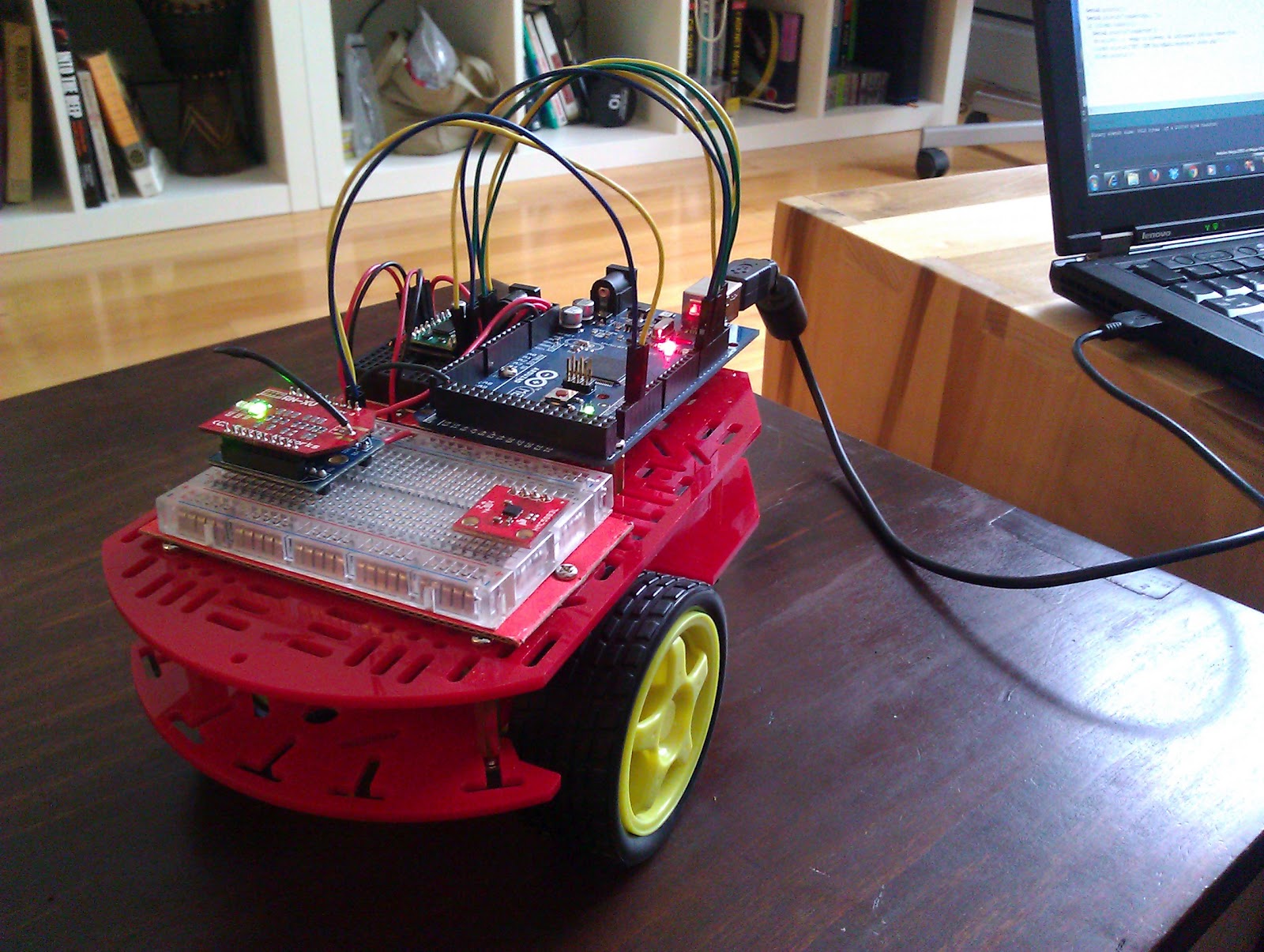 Here’s what it looks like so far. Ignore the little square board towards the bottom right, that’s a magnetometer which I plan to use later.
I found the right library for the job with a little help from Tedbot, who has a couple of blog posts on getting started with the RN-XV on his site. Here he recommends using this WiFly library by jcrouchley.
There is the start of a “polling client” sketch, where the arduino is repeatedly requesting new data from a server. The idea is to have the arduino send it’s sensor data to the server via HTTP requests and the response would contain commands that the robot will follow.
#include "WiFly.h"
#include "MotorDriver.h"

#define motorAPWM 11
#define motorAIN1 12
#define motorAIN2 13
#define motorBPWM 10
#define motorBIN1 9
#define motorBIN2 8

MotorDriver leftMotor = MotorDriver(motorAIN1, motorAIN2, motorAPWM);
MotorDriver rightMotor = MotorDriver(motorBIN1, motorBIN2, motorBPWM);

WiFlyClient client("192.168.1.101", 800);

void setup() {

  Serial.begin(9600);
  Serial1.begin(9600);

  WiFly.setUart(&Serial1);
  WiFly.begin();

  Serial1.println("set comm idle 2"); // close an inactive conn in 2 seconds
  WiFly.join("your_ssid", "your_passphrase");
}

void loop()
{
  getData();
}

void getData()
{
   if (client.available()) {
    char c = client.read();
    Serial.print(c);
  }

  if (!client.connected()) {
    //delay(100);
    sendRequest();
  }
}

void sendRequest()
{
  Serial.println();
  Serial.println("connecting…");
  if (client.connect()) {
    Serial.println("connected");
    delay(100); // seems to prevent an infrequent failed connection
    client.println("GET /robotServer/server.php");
    client.println();
  }
}
The PHP code is dead simple at this point. I am using WAMP as a PHP server hosted on my laptop.
<?php
  echo 'Robot Server';
?>
In your Arduino IDE terminal window you should now see the string “Robot Server” returned every 1 second or so. Once in a while a request fails. I’m not sure why it fails, but thanks to the line of code “set comm idle 2″, the failure doesn’t stay open indefinitely and instead closes in 2 seconds on inactivity. I also noticed putting a short delay here or there greatly reduces the number of failed requests.
Ad-hoc Mode
When I first tried to make an Arduino program to control the RN-XV, I tried various libraries I found online, none of which seemed to work properly. Obviously the next step was to RTFM, which in this case was pretty helpful and I was able to make an ad-hoc connection to the module. What this means is that the little RN-XV can turn itself into a wireless endpoint, which you can use your computer to connect to, just as you would to any wi-fi network. This part is completely optional (not that the rest is required), it just helps to better understand the capabilities of the module. Here’s how to use ad-hoc mode:
- In addition to GND, 3.3V, TX, RX, also connect PIO9 (pin 8) to 3.3V
- Recycle power, since PIO9 is high, it goes into ADHOC mode
- Connect to the “WiFly” ssid from my laptop
- Telnet to the IPAddress 169.254.1.1:2000 You should now see HELLO on your telnet screen
- Type $$$ (with no return carriage). You shold now see CMD on your telnet screen
- Perform the commands (with return carriage after each): set wlan phrase YOUR_PASS_PHRASE set wlan ssid YOUR_SSID save reboot
- when i did this each letter showed up twice as i typed, but didn’t seem to matter
- When it rebooted, i lost the connection, but since my CoolTerm window was open, i noticed the RN-XV automatically connected to specified SSID and got an ip. My laptop jumped back to my usual wifi network as well.
- I telnet to that new IP
- It should again say HELLO, Again type $$$ and again it says CMD.
- Now type “ftp u” and the firmware update is performed using your wi-fi network’s internet access!
Now everytime it powers on, it jumps onto your wi-fi network, and it can turn your arduino into a webserver. You can try this by typing the IP and port number into a browser like so:
http://192.168.1.114:2000